Is your TV wobbling or feeling unstable on its stand? You might not realize how risky that can be—not just for your expensive screen but for everyone around it.
Securing your TV to the stand is a simple step that can prevent accidents, protect your investment, and give you peace of mind. You’ll discover easy, practical ways to keep your TV steady and safe. Keep reading, and you’ll learn how to protect your home and enjoy your entertainment without worry.

Credit: fitueyes.com
Choosing The Right Stand
Securing your TV to a stand keeps it safe and stable. Picking the right stand is key to avoid accidents and damage.
This guide covers important points to help you choose a proper TV stand. Focus on compatibility, weight, and materials.
Consider Stand Compatibility
Make sure the stand fits your TV’s size and style. Measure the TV base and match it with the stand’s surface.
- Check the width and depth of the stand top
- Match the stand design with your TV’s model
- Confirm the stand allows easy cable access
Check Weight Capacity
Each stand has a weight limit. The stand must hold the TV’s full weight safely.
| TV Size | Average Weight (lbs) | Recommended Stand Capacity (lbs) |
| 32 inches | 15 | 20 |
| 50 inches | 30 | 40 |
| 65 inches | 50 | 60 |
| 75 inches | 70 | 80 |
Select Stable Materials
Choose stands made from strong, stable materials. This prevents wobbling and tipping.
- Solid wood offers durability and weight
- Metal stands provide firm support
- Tempered glass should be thick and secure
- Plastic stands may not hold heavy TVs well

Credit: www.amazon.ca
Preparing Your Tv And Stand
Securing your TV to the stand keeps it safe and steady. Preparing well makes the process easier.
Follow simple steps to get your TV and stand ready for secure installation.
Clear The Area
Remove all items around the TV and stand. This gives you room to work safely.
Clear space helps prevent accidents and makes it easy to access the TV and stand.
- Unplug all cables from the TV
- Move furniture away from the TV stand
- Keep the floor clear of obstacles
- Have a soft surface nearby to place the TV if needed
Gather Necessary Tools
Collect all tools before starting to avoid interruptions. Tools depend on your TV and stand type.
Having tools ready helps you work quickly and safely when securing the TV.
- Screwdrivers (Phillips and flathead)
- Stud finder for wall mounting
- Measuring tape
- Level to check alignment
- Mounting screws and brackets (usually included with stand)
- Soft cloth to protect the TV screen
Inspect Mounting Points
Check the TV’s mounting holes and the stand’s attachment areas. Look for damage or missing parts.
Strong mounting points keep the TV stable and prevent it from falling or tilting.
- Find the mounting holes on the back of your TV
- Check if screws and brackets fit the holes
- Inspect the stand’s mounting surface for cracks or loose parts
- Make sure the stand supports your TV’s size and weight
Securing The Tv To The Stand
Securing your TV to the stand keeps it safe from falling or tipping. It is important to follow the right steps to protect your TV and your family.
This guide explains how to attach mounting brackets, use safety straps, and tighten screws properly for a secure setup.
Attach Mounting Brackets
Start by finding the mounting holes on the back of your TV. Use the brackets that came with your TV or stand. Attach the brackets firmly with the screws provided.
- Locate the mounting holes on the TV.
- Align the brackets with the holes.
- Use a screwdriver to fasten the screws tightly.
- Check that the brackets do not wiggle or move.
Use Safety Straps
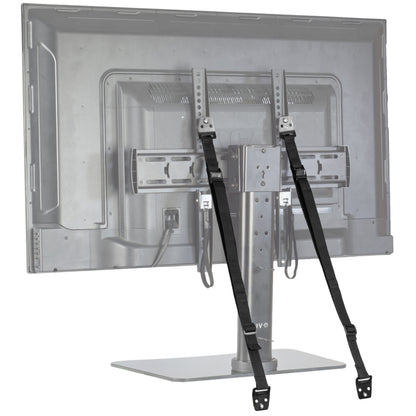
Safety straps add extra security by holding the TV to the stand or wall. They help prevent the TV from falling forward or sideways.
| Type of Safety Strap | Use | Material |
|---|---|---|
| Velcro Straps | Easy to adjust and remove | Strong fabric |
| Metal Straps | More durable and secure | Steel or aluminum |
| Plastic Straps | Lightweight but less strong | High-strength plastic |
Attach safety straps to the TV and stand. Tighten them so the TV cannot tip over.
Tighten All Screws Properly
Check every screw on the mounting brackets and safety straps. Loose screws can cause the TV to fall.
- Use a screwdriver that fits the screw heads.
- Tighten screws until they are snug but avoid over-tightening.
- Double-check all screws after installation.
- Repeat this check regularly to keep the TV secure.
Final Stability Checks
Securing your TV to its stand is important for safety. Final stability checks help ensure the TV stays steady.
These checks reduce the risk of the TV tipping over or falling. Always take time to complete them carefully.
Test For Wobbling
Gently push the TV from different sides. See if it moves or rocks on the stand.
If the TV wobbles, it means the stand or base is not stable enough. Fix this before use.
- Push the TV gently forward and backward
- Push the TV from left to right
- Check if the TV stays firm without shaking
Adjust Placement If Needed
Move the TV or stand slightly to find the most stable spot. The surface should be flat and strong.
Make sure the TV is centered on the stand to keep balance. Avoid placing it near edges.
- Place the stand on a flat surface
- Center the TV on the stand base
- Avoid uneven or soft surfaces
Maintain Regular Inspections
Check the TV and stand often for any signs of looseness or damage. This keeps the setup safe over time.
Tighten screws and fix any issues right away. Regular inspections help prevent accidents.
- Look for loose screws or bolts
- Check for cracks or damage on the stand
- Test stability every few weeks

Credit: www.canadiantire.ca
Frequently Asked Questions
How Do I Secure My Tv To A Stand Safely?
Use mounting straps or brackets designed for TVs. Attach them firmly to the TV and stand to prevent tipping. Always follow the manufacturer’s instructions for best results and safety.
What Tools Are Needed To Secure A Tv To A Stand?
Basic tools include a screwdriver, drill, and measuring tape. You may also need mounting straps or brackets. Ensure all tools fit the screws and hardware provided.
Can I Secure Any Tv To Any Stand?
Not all TVs fit every stand. Check the TV size and weight limits of the stand. Use compatible mounting kits to ensure a secure fit and stability.
Why Is Securing My Tv To The Stand Important?
Securing your TV prevents accidental tipping and damage. It also protects children and pets from injuries. A stable TV setup ensures long-term safety and peace of mind.
Conclusion
Securing your TV to the stand keeps it stable and safe. It helps prevent accidents and damage. Using the right tools and methods makes the process easy. Always check the stand and TV model before starting. A secure setup gives peace of mind while watching.
Take your time and follow steps carefully. A well-secured TV looks neat and stays firm. Safety matters most in every home or office.